Wisehosting KB
  • Home
  • About
Sign in Subscribe
Billing & Account

How to Cancel Your PayPal Subscription

A step-by-step guide on how to cancel your PayPal subscription.

Zach Kõrgemäe

Zach Kõrgemäe

13 Feb 2026 — 1 min read
Share
👉
If you cancel your service through our billing area, but not through PayPal, you may still be charged and is a known issue in the subscription industry.

We cannot remove the subscription automatically as it was set through YOUR PayPal account, which we do not have access to.


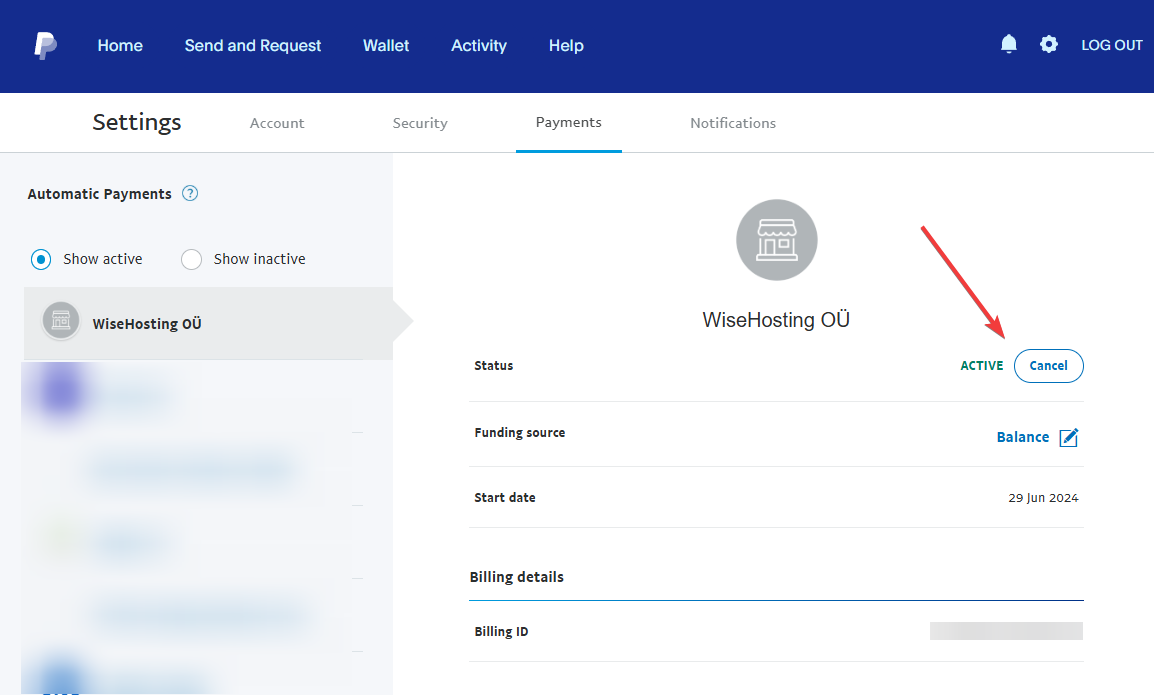
How to Cancel Your PayPal Subscription?

  1. Log into your PayPal account that the subscription was set up on.
  2. Navigate to the Subscriptions page here: https://www.paypal.com/myaccount/autopay
  3. Ensure that you do not have WiseHosting OÜ under the Show Active list. If you do, click on it and click on the Cancel button.
Read more

Top 3 Mods/Modpack Startup Crashes and How to Fix Them

Modded Minecraft servers usually fail to start for one of three reasons: a missing dependency, a client-only mod, or a mod conflict. Here's how to identify each one in your console or crash report and fix it.

By Rene F 25 Aug 2026

How to Install Plugins to Your Minecraft Server

A step-by-step guide on how to install plugins on your Minecraft server.

By Zach Kõrgemäe 03 Jul 2026

How to Convert a Server World into a Singleplayer World

A step-by-step guide on how to move your world from multiplayer server to singleplayer.

By Zach Kõrgemäe 03 Jun 2026

How to Download Your Entire Server from WiseHosting

A step-by-step guide on how to download your entire server.

By Zach Kõrgemäe 13 Feb 2026
Wisehosting KB
  • Sign up
Powered by Ghost

Wisehosting KB

Thoughts, stories and ideas.